Skills
Skills eliminate the need to pick the right MCP tool manually. You describe your situation; the causely-mcp router picks the matching specialist; the specialist runs the correct tool sequence for you. All 29 MCP tools are covered across 7 skills: one master router plus 6 specialists.
How it works
causely-mcp is the master router that sits above the six specialist skills. It activates on any observability or reliability question and matches your prompt against each specialist's trigger set, delegating to the closest fit. The router also pulls in complete-investigation.md as a shared reference so specialists can coordinate context across multi-step investigations. You never invoke a specialist directly; the router handles that automatically, though you can override it when needed.
Client support
| Client | Install |
|---|---|
| Claude Code | Manual (copy from repo) |
| Claude Desktop | Manual (copy from repo) |
| Cursor | Plugin (one-click) or Manual |
| Codex | Manual (copy from repo) |
| VS Code Copilot | Manual (copy from repo) |
causely-alert-triage
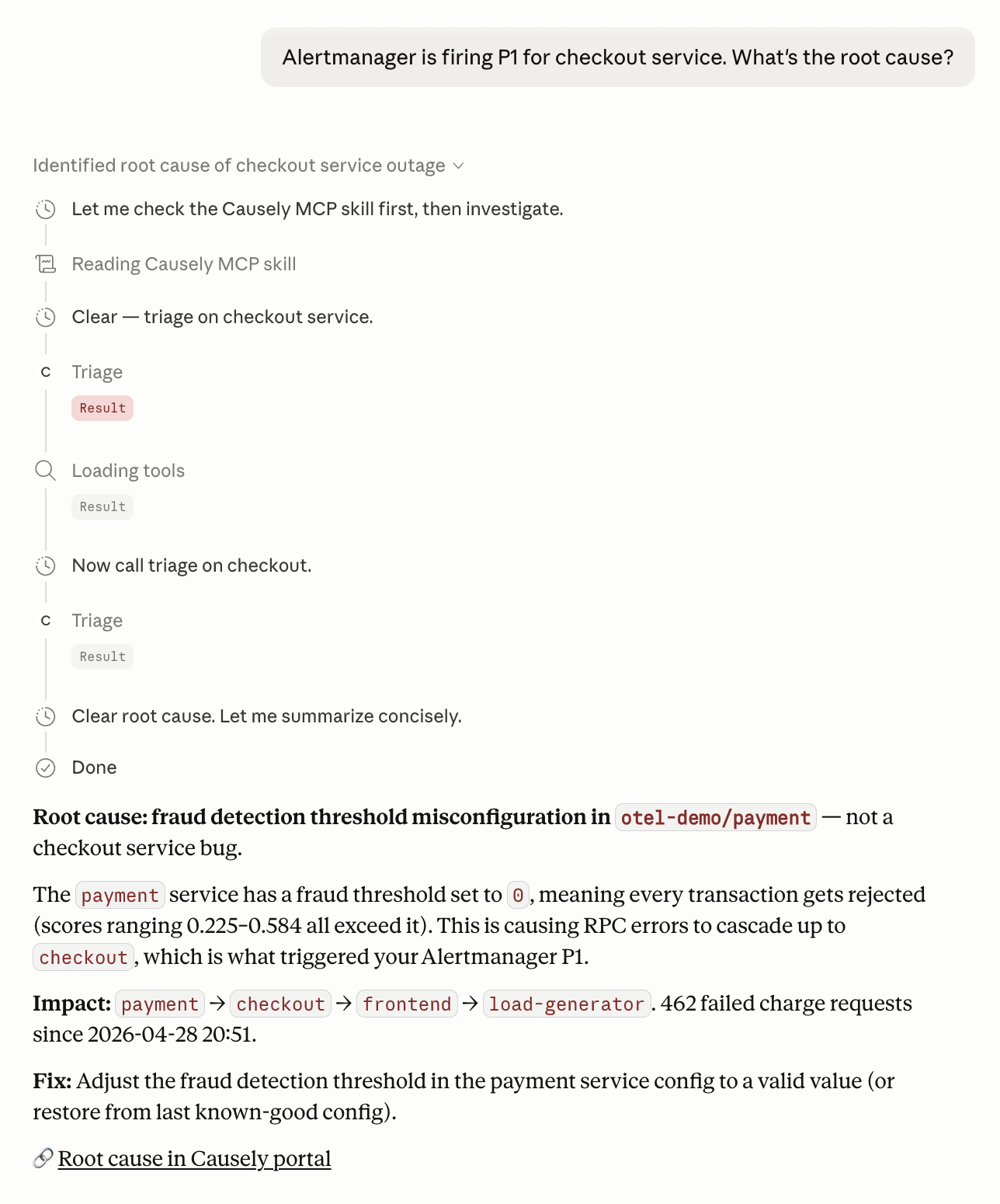
Activates on any message that names or describes an incoming alert from PagerDuty, Datadog, Prometheus/Alertmanager, Slack, or OpsGenie, or asks what a firing alert means.
Example trigger prompts
- "PagerDuty is firing P1 for checkout-service. What's the root cause?"
- "I have three Datadog alerts going off at once. Which one actually matters?"
- "OpsGenie woke me up at 2 AM for payment-processor. Is this real or noise?"
- "Alertmanager is showing HighErrorRate on api-gateway. What's actually broken?"
Under the hood
Calls get_alerts to fetch the raw alert payload (supports substring search by alert name with no entity IDs needed), investigate_alert as a one-step follow-up to get entity health alongside the alert context, and get_issues to surface the confirmed diagnosis cause for mapped alerts.
causely-change-impact
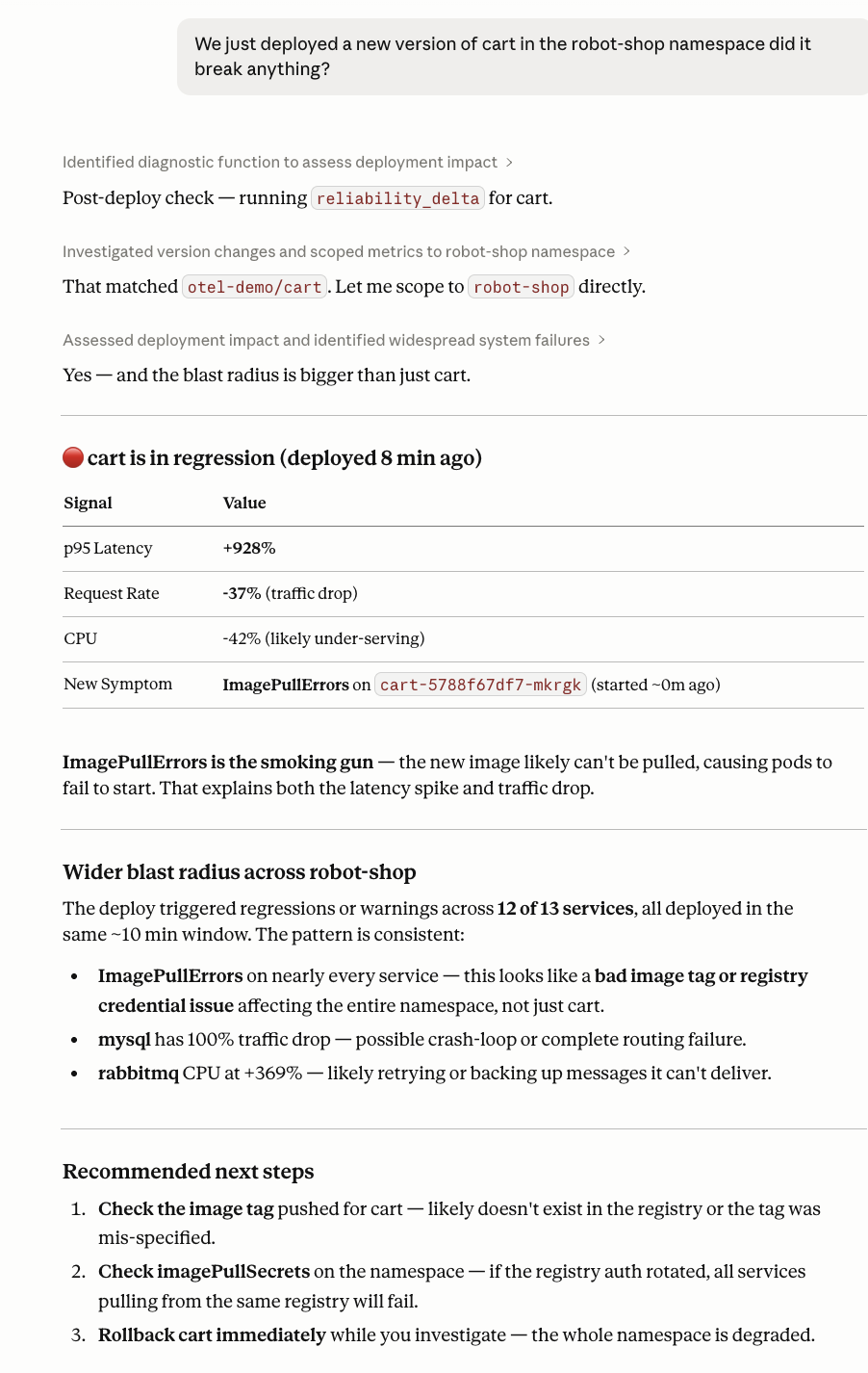
Activates on any message asking whether a recent deployment, rollout, or config change caused a regression or reliability shift.
Example trigger prompts
- "We deployed v2.3.1 of order-service 20 minutes ago. Did it break anything?"
- "Reliability got worse right after this morning's rollout. What degraded?"
- "Compare service health before and after today's deploy to checkout."
- "Did our canary release introduce any downstream failures?"
Under the hood
Calls get_events to locate the deployment event, reliability_delta to compare reliability before and after, fleet_reliability_delta for a fleet-wide comparison, get_incident_impact to retrieve the responsible service and impacted services with business context once a diagnosis is confirmed, get_config to inspect the deployed configuration, and get_metrics for specific metric trends.
causely-correlated-incidents
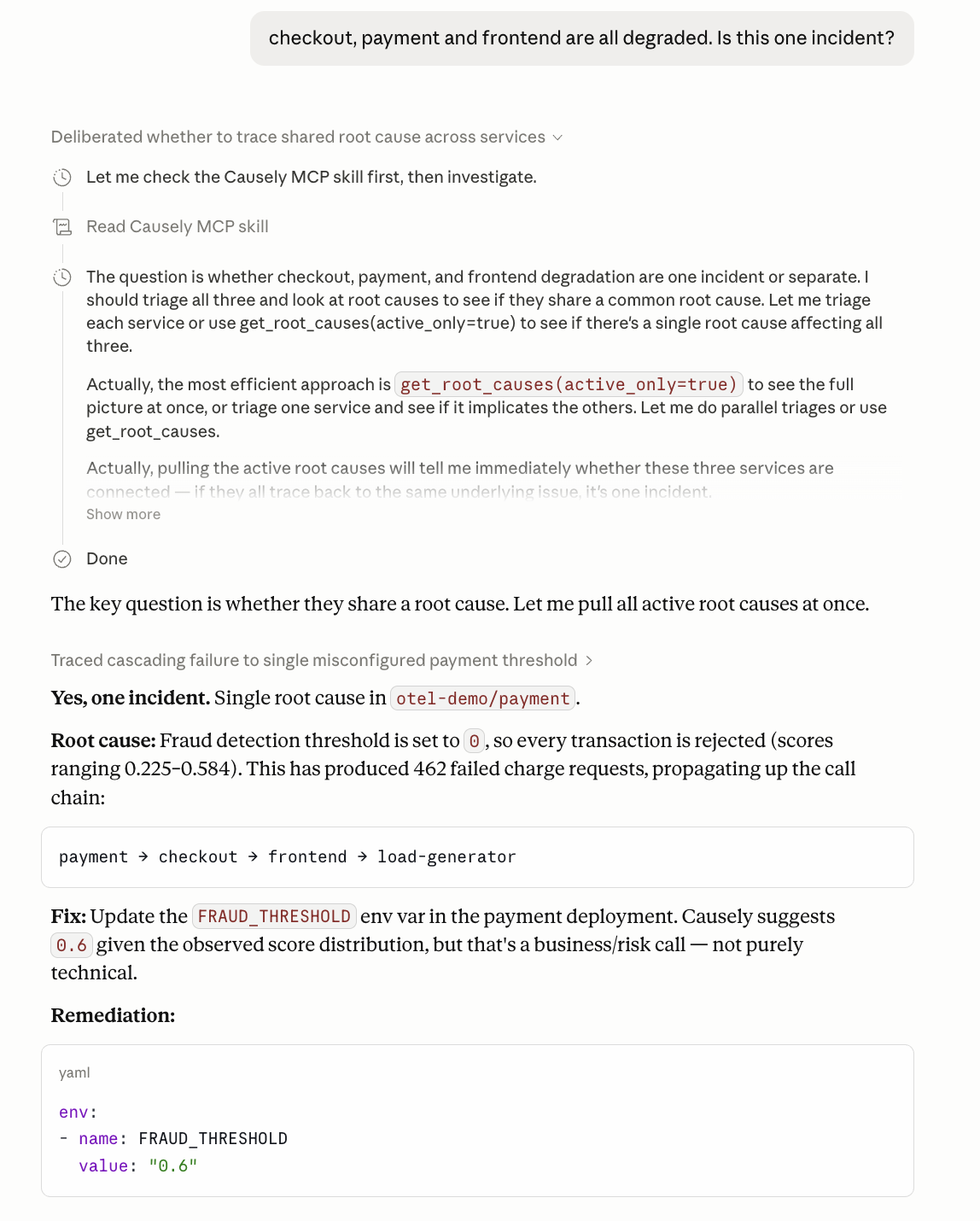
Activates on any message describing multiple services alerting simultaneously, or asking about blast radius, cascading failures, dependency chains, or whether separate incidents share a single cause.
Example trigger prompts
- "Five services are alerting at the same time. Is there a single root cause?"
- "Checkout, payments, and inventory all degraded. Is this one incident?"
- "We have a cascade in production. Where did it start?"
- "Which services will be affected if database-primary goes down?"
Under the hood
Calls get_issues to find all active Issues and their Diagnoses, get_topology to map the dependency graph and blast radius, get_alerts to correlate firing alerts across services, and get_incident_impact to retrieve the responsible service and blast radius with business context for a confirmed Issue.
causely-health-reporting
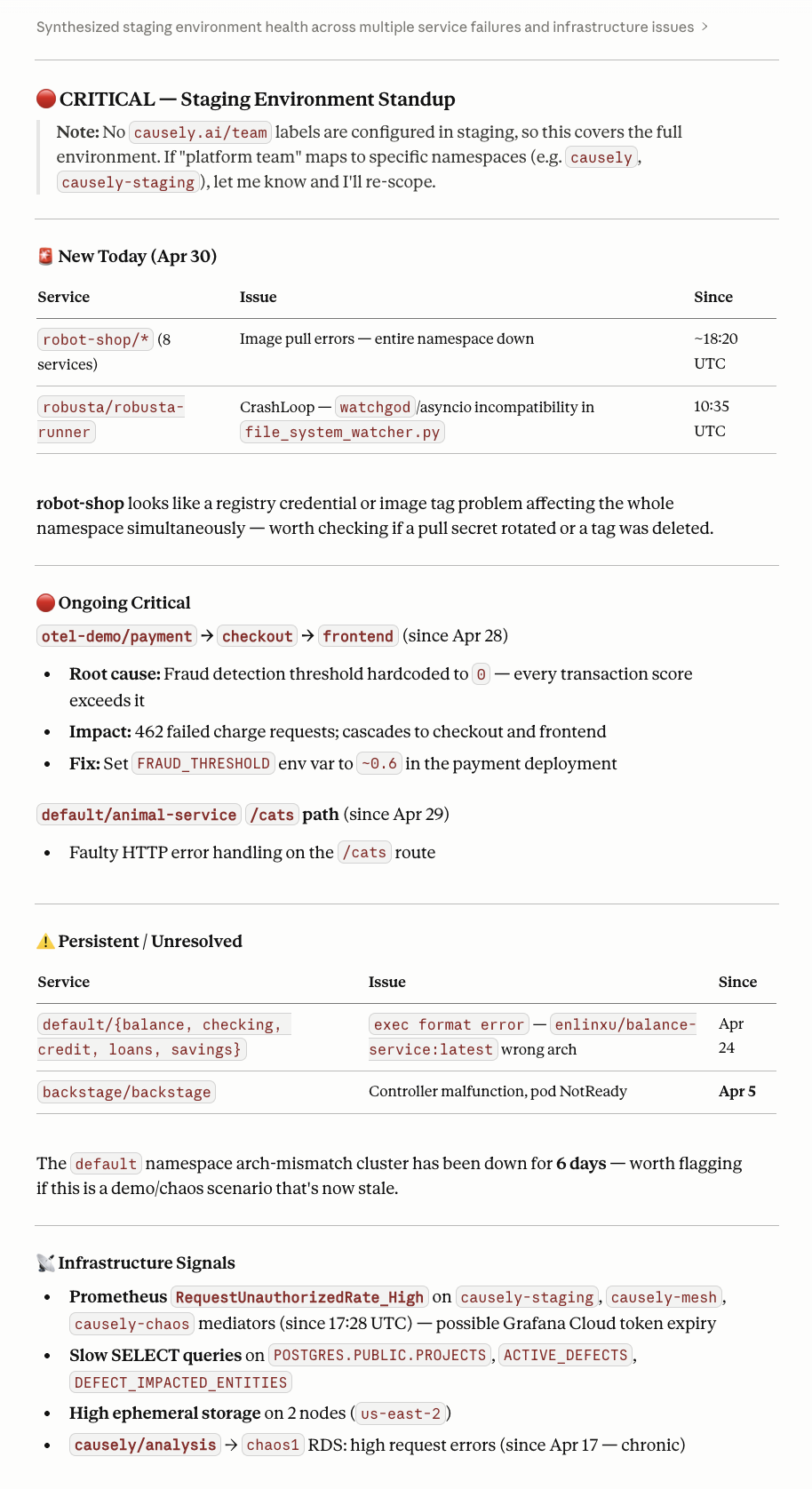
Activates on any request for a health summary, SLO status update, standup report, reliability overview spanning multiple services or an entire environment, or a single-service health check ("is X healthy?").
Example trigger prompts
- "Give me a standup summary of service health for the platform team."
- "Which services are closest to breaching their SLOs this week?"
- "Summarize overnight health of all production services."
- "What's the reliability snapshot for the checkout domain?"
Under the hood
Calls get_environment_health for an environment-wide summary, get_service_summary for per-service detail, get_slo for SLO status, team_health for team-scoped aggregation, get_symptoms for a full signal scan across all entities, and get_diagnoses to flag any active issues.
causely-k8s-investigation
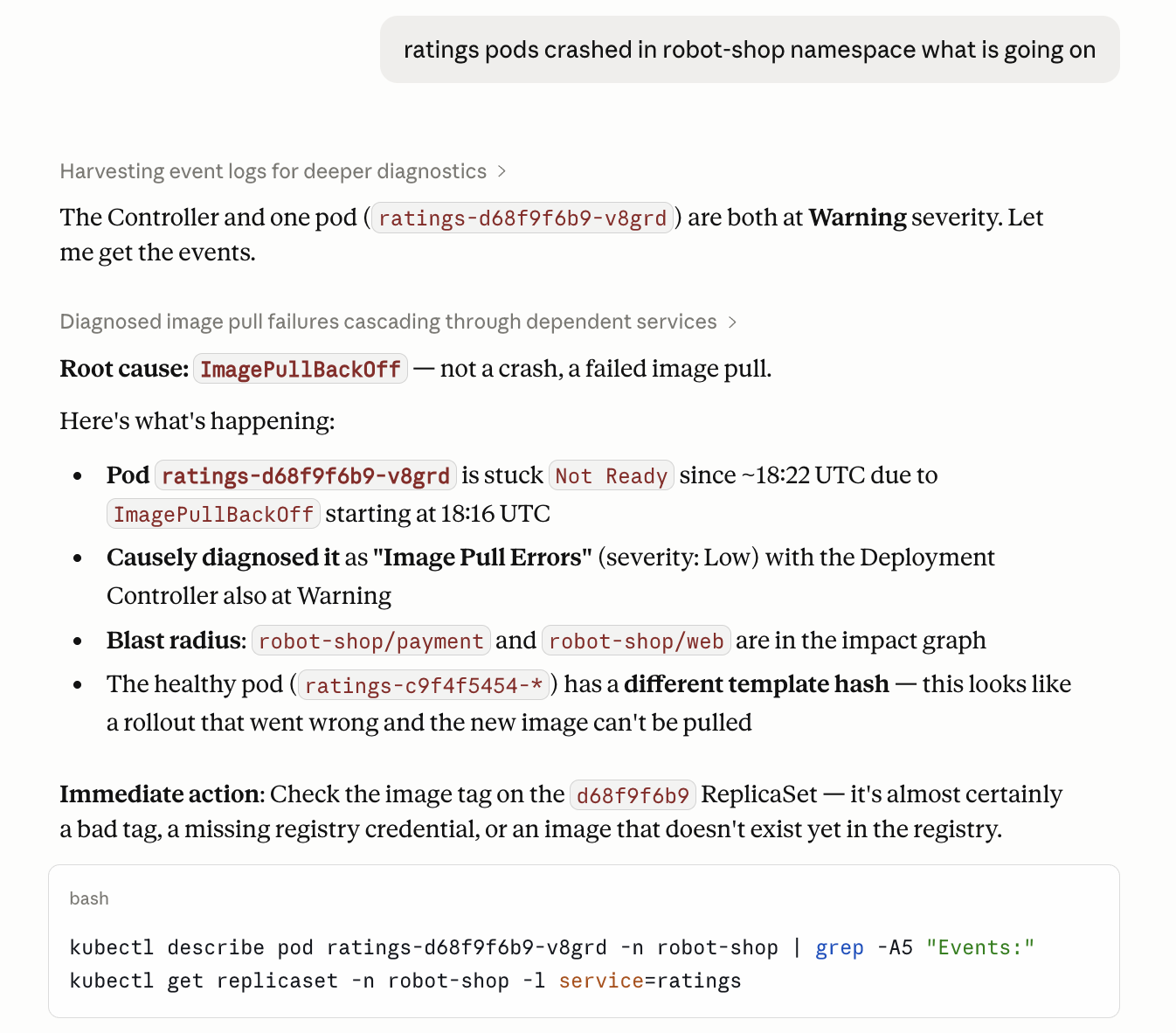
Activates on any message about Kubernetes infrastructure health: nodes, pods, namespaces, deployments, DaemonSets, or containers. These include OOMKills, pod restarts, node pressure, scheduling failures, resource exhaustion, CrashLoopBackOff, and evictions.
Example trigger prompts
- "payment-processor pods keep OOMKilling. What's causing it?"
- "Why does api-gateway restart every few hours?"
- "Node pressure is high on cluster west-1. Which workloads are to blame?"
- "My pods are crash-looping but the logs don't show an obvious error."
Under the hood
Calls get_service_summary for a full service-level health check, get_environment_health for namespace sweeps, get_symptoms for a pod-level signal scan, get_incident_impact to retrieve the responsible service and impacted services with business context for a confirmed issue, get_entity_health for pod or node status, get_events for recent Kubernetes events (OOMKill, CrashLoopBackOff, evictions), get_config to inspect resource requests and limits, get_metrics for CPU and memory trends, get_logs for container log analysis, and get_diagnoses scoped to a namespace.
causely-postmortem
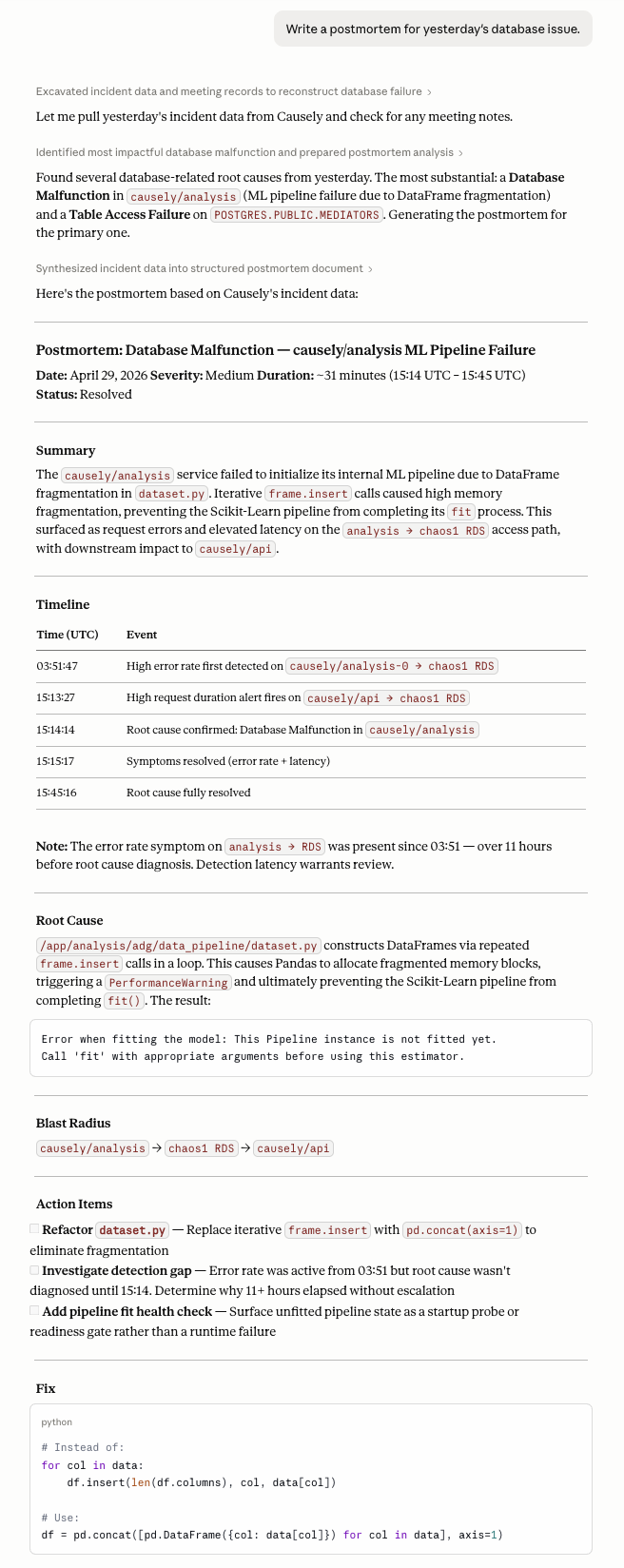
Activates on any request to write a postmortem, incident retrospective, or create a ticket documenting a completed or past incident.
Example trigger prompts
- "Write a postmortem for yesterday's checkout incident."
- "Draft a Jira ticket for the payment service incident last night."
- "Create an incident retrospective for the database brownout on Friday."
- "Generate an RCA document for the cascade failure in production on April 25."
Under the hood
Calls get_diagnoses to reconstruct the incident timeline, postmortem to generate the structured retrospective document, and generate_ticket to create a Jira or Linear ticket draft.
Overrides and escape hatches
Force a specific skill
Prefix your prompt with use causely-<skill-name> to bypass the router and invoke a specific specialist directly:
use causely-postmortem: write a retrospective for the payment incident on April 25
Bypass skills entirely
You can call MCP tools directly without involving any skill. See the Full Tool Reference for the complete list of tools and parameters.
If the wrong skill activates
Tell the agent which skill to use instead: use causely-<correct-skill-name>. If a skill consistently miss routes on a prompt you expect to work, email support@causely.ai with the prompt text and which skill activated.