Signal Delay
Causely automatically detects service Signals based on various metrics. To avoid alerting on brief spikes or temporary blips, Causely uses activation and deactivation delays: a Signal must remain in violation of thresholds for a sustained period before it activates, and must return to normal for the same period before it clears. This document explains how these delays work and how to configure them for your services.
How Signal Delays Work
Signal delays serve two purposes:
- Prevent false positives: Brief metric spikes don't trigger Signals or alerts; only sustained issues are surfaced.
- Provide stability: Signals remain active until the issue is genuinely resolved, reducing flapping and noise.
The Signal activation delay depends on the type of issue:
- Bursty issues (sudden spikes): the 5-minute average is > a multiple of the configurable threshold
- Sustained issues (slow creep above threshold): the 30-minute average is > the configurable threshold
The default activation delay is 5 minutes. A Signal must match one of the above conditions for 5 minutes.
Deactivation also uses 5 minutes. During this 5 minute period the 5-min average must be below the higher threshold and the 30-min average must be below the threshold.
Request Error Rate Signal
Causely activates a Request Error Rate Signal when either of these conditions is met:
- Condition 1: Bursty spike: 5-minute average error rate > 4× the threshold (default: 1–2%)
- Condition 2: Sustained elevation: 30-minute average error rate > threshold
In either case, the condition must be true and the request rate must be > 0.3 req/sec (0.2 req/sec for HTTP Path or RPC Method) for 5 consecutive minutes.
Deactivation:
The Signal clears in either case:
- Recovery: Neither of the above condition 1 nor 2 holds for 5 consecutive minutes.
- Silence: The 5-min and 30-min average request rate is ≤ 0.3 req/sec (0.2 req/sec for HTTP Path or RPC Method); deactivates regardless of error rate.
Practical Effect:
A sudden 4× error rate spike that holds for 5+ minutes triggers quickly. A service that creeps above threshold gradually requires 30 minutes of sustained violation before alerting. Once fixed, it clears after a matching period of recovery.
Request Duration (Latency) Signal
Causely activates a Request Duration Signal when either of these conditions is met:
- Condition 1: Bursty spike: 5-minute average latency > 1.5× threshold
- Condition 2: Sustained elevation: 30-minute average latency > threshold
In either case, the condition must be true and the request rate must be > 0.3 req/sec (0.2 req/sec for HTTP Path or RPC Method) for 5 consecutive minutes.
Deactivation:
The Signal clears if neither of the above condition 1 nor 2 holds for 5 consecutive minutes.
Practical Effect:
A sudden 1.5× latency spike that holds for 5+ minutes triggers quickly. A service that slowly creeps above its baseline requires 30 minutes of sustained violation before alerting. Once fixed, it clears after a matching period of recovery.
Activation Delay Configuration
The activation delay for Service-level Request Error Rate and Request Duration Signals is configurable. Configurations do not apply to HTTP Path or RPC Method Signals.
For threshold configuration (default thresholds for triggering Signals), see Threshold configuration.
Configuration Methods
You can configure activation delay using the following methods:
-
Causely UI Best for making a targeted adjustment while looking at the metric that's driving a Signal, without touching service metadata or deployment configuration.
-
Service metadata Lets you configure activation delay declaratively using Kubernetes labels, Nomad service tags, or Consul service metadata. Well suited for version-controlled, environment-specific configuration that travels with your service definition.
-
Causely API Best for programmatic configuration, automation, and integration with internal tooling or workflows.
Using the Causely UI
To configure activation delay in the UI:
- Navigate to the service you want to configure.
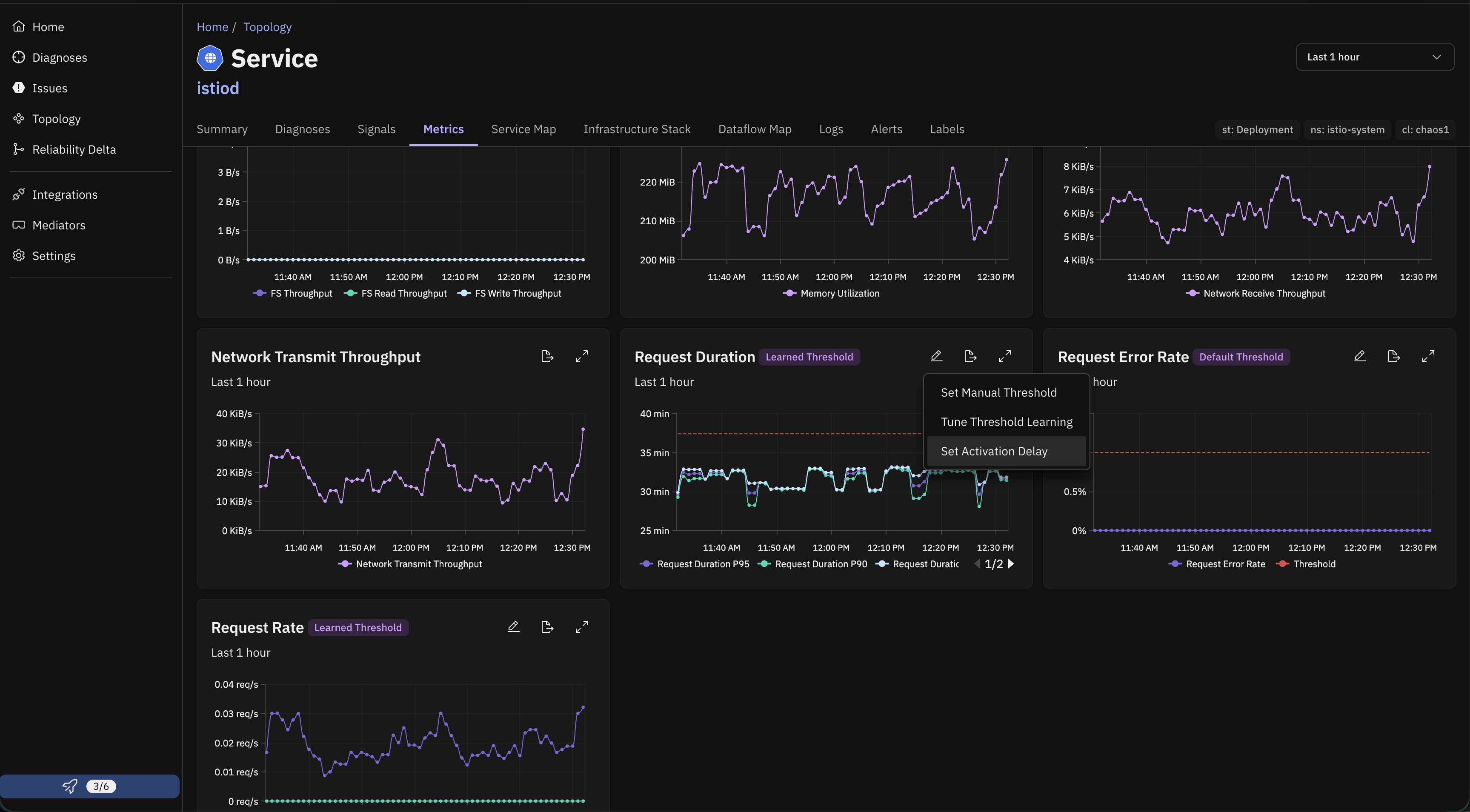
- Select the Metrics tab, then find the card for the relevant Signal metric (for example, Request Duration or Request Error Rate).
- Click the pencil icon on the metric card to open its configuration menu, then select Set Activation Delay.
- Enter the activation delay in minutes and select Save Activation Delay.
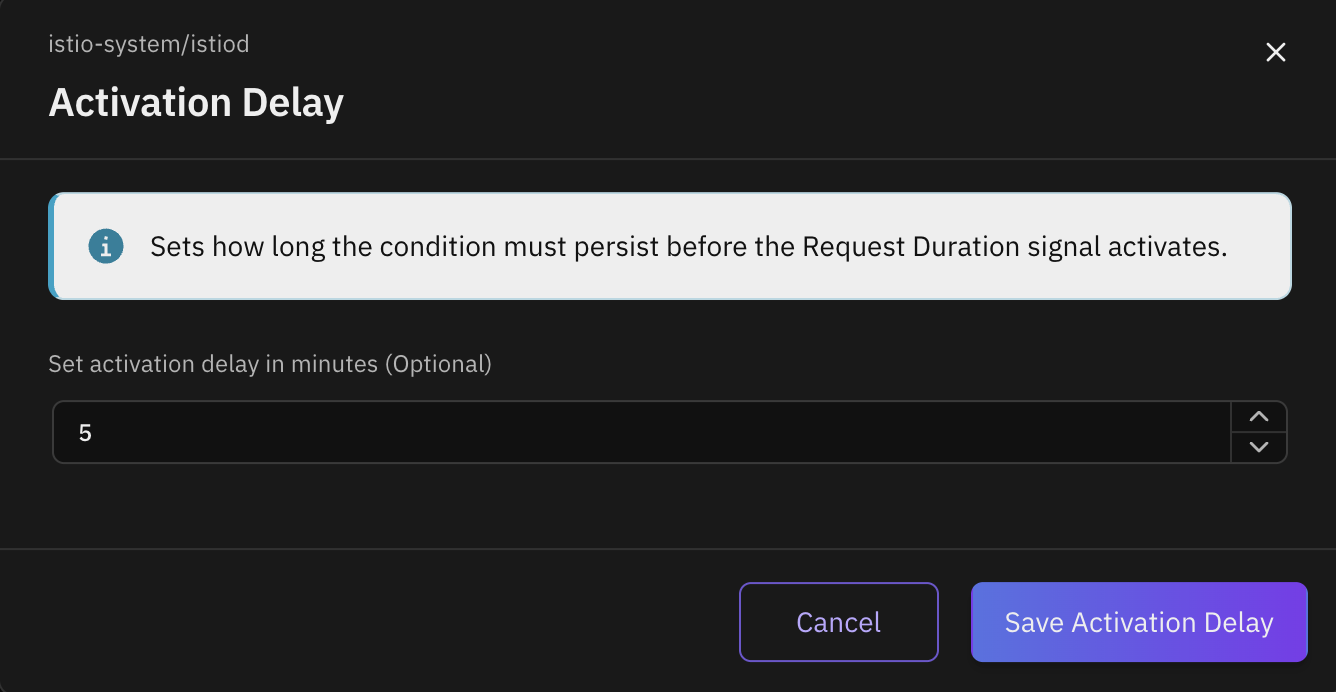
This sets an individual override for the Signal on that entity. Leaving the field empty reverts the Signal to its default (or label-configured) activation delay.
Using Service Metadata
Using Kubernetes Labels
Apply labels to your services:
# Configure error rate activation delay (example: 3 minutes)
kubectl label svc -n <namespace> <service-name> "causely.ai/error-rate-activation-delay=3"

# Configure latency activation delay (example: 3 minutes)
kubectl label svc -n <namespace> <service-name> "causely.ai/latency-activation-delay=3"
Using Nomad Service Tags
Add tags to your service definition:
job "example" {
  group "app" {
    service {
      name = "my-service"
      port = 8080

      tags = [
        "causely.ai/error-rate-activation-delay=3",
        "causely.ai/latency-activation-delay=3"
      ]
    }
  }
}
Using Consul Service Metadata
Register services with metadata:
consul services register \
  -name="my-service" \
  -port=8080 \
  -meta="causely.ai/error-rate-activation-delay=3" \
  -meta="causely.ai/latency-activation-delay=3"
Delay Values
- Valid Range: 1–60 minutes
- Configures: Bursty activation delay only (default: 5 minutes)
- Fixed: Sustained activation delay (always 30 minutes)
- Recommended Range: 1–10 minutes for most use cases
Using the Causely API
Activation delay can also be configured programmatically through the Causely GraphQL API, at the individual entity, label, or global scope. This is best suited for automation, bulk configuration, or integrating activation delay changes into internal tooling.
Best Practices
-
Start with defaults: 5 minutes works for most services. Only adjust if you're seeing false positives (bursty spikes that recover quickly) or need faster detection of genuine issues.
-
Shorter delays (1–3 min) for:
- Payment or high-revenue services where quick spike detection is critical
- Services where you expect sudden issues to be real problems, not transient noise
-
Longer delays (5–10 min) for:
- Services with frequent harmless spikes, for example, traffic bursts, cache refreshes
- Noisy services where bursty patterns are normal and don't indicate problems
- Non-production environments
-
Keep in mind: The 30-minute sustained delay is fixed and cannot be adjusted. This ensures slow, creeping issues are not misclassified as false positives.
-
Monitor after changes: After adjusting bursty delays, observe whether spike detection improves or false positives decrease.
-
Document your reasoning: Keep notes on why you chose specific delays per service. This helps during onboarding and reviews.
Examples
Critical Service (Payment Processing)
Faster detection of error spikes:
Kubernetes:
kubectl label svc -n production payment-api "causely.ai/error-rate-activation-delay=2"
kubectl label svc -n production payment-api "causely.ai/latency-activation-delay=2"
Effect: Error rate spikes are detected after 2 minutes of sustained elevation (vs. default 5). Slow degradation still requires 30 minutes.
Bursty Service (Traffic Spikes)
Reduce noise from normal traffic bursts:
Kubernetes:
kubectl label svc -n production data-processor "causely.ai/error-rate-activation-delay=8"
kubectl label svc -n production data-processor "causely.ai/latency-activation-delay=8"
Effect: Brief error spikes during load bursts don't trigger until 8 minutes (giving time to recover). Slow issues still activate after 30 minutes.
Development Environment
Longer delays to minimize disruptions:
Kubernetes:
kubectl label svc -n dev api-service "causely.ai/error-rate-activation-delay=10"
kubectl label svc -n dev api-service "causely.ai/latency-activation-delay=10"
Effect: Dev spikes require 10 minutes to trigger (vs. 5). Sustained issues always take 30 minutes, same as production.