Instana Quickstart Guide
This quickstart guide will help you get Causely up and running with Instana. This setup allows Causely to ingest service dependencies, traces, and metrics from Instana to build a unified causal model.
Get Your Installation Command
- Log in to the Causely portal.
- Visit the mediators page.
- Click the "Add new" button (or "Add ➕" button) on the mediators page.
- In the instructions panel, you'll see the Helm installation command with your access token pre-filled.
- Copy the complete Helm command. It will look similar to the example below.
The command you copy will include your specific access token and cluster name. Here's what it typically looks like:
export CAUSELY_TOKEN=<your_token>
export CAUSELY_CLUSTER_NAME=<your_cluster_name>
export CAUSELY_VERSION=<version>
helm upgrade --install causely \\
  --create-namespace oci://us-docker.pkg.dev/public-causely/public/causely \\
  --version "${CAUSELY_VERSION}" \\
  --namespace=causely \\
  --set image.tag="${CAUSELY_VERSION}" \\
  --set global.cluster_name="\${CAUSELY_CLUSTER_NAME}" \\
  --set mediator.gateway.token="\${CAUSELY_TOKEN}"
Screenshots of the mediators page, "Add new" button, and instructions panel will be added here.
Create a Values File to Disable eBPF
Since you'll be using Instana for instrumentation, create a causely-values.yaml file to disable eBPF instrumentation:
global:
  cluster_name: <your_cluster_name>
mediator:
  gateway:
    token: <your_token>
scrapers:
  bpf:
    enabled: false
Replace <your_cluster_name> and <your_token> with your actual values from the portal.
Run the Installation Command
- Open a terminal with
kubectlconfigured to access your cluster. - Run the Helm command with your values file:
export CAUSELY_VERSION=<version>
helm upgrade --install causely \\
  --create-namespace oci://us-docker.pkg.dev/public-causely/public/causely \\
  --version "${CAUSELY_VERSION}" \\
  --namespace=causely \\
  --set image.tag="${CAUSELY_VERSION}" \\
  --set global.cluster_name="<your_cluster_name>" \\
  --set mediator.gateway.token="<your_token>" \\
  --values causely-values.yaml
- Wait for the installation to complete:
kubectl wait --for=condition=Ready pod -l app.kubernetes.io/part-of=causely -n causely --timeout=300s
Configure Instana Integration
Now you need to configure Causely to scrape data from your Instana account.
Step 6a: Create an API Token in Instana
- Log in to your Instana instance.
- Create an API token with read access to applications, endpoints, metrics, and infrastructure.
Step 6b: Create a Kubernetes Secret
Create a Kubernetes secret with your Instana URL and API token:
kubectl create secret generic \
  --namespace causely instana-credentials \
  --from-literal=url="https://your-instana.example.com" \
  --from-literal=api-token="<your_instana_api_token>"
If your Instana instance uses a self-signed certificate, you can optionally add:
--from-literal=insecure-skip-verify="true"
Step 6c: Update Causely Configuration
Update your causely-values.yaml to enable Instana scraping:
global:
  cluster_name: <your_cluster_name>
mediator:
  gateway:
    token: <your_token>
scrapers:
  bpf:
    enabled: false
  instana:
    enabled: true
    accounts:
      - secretName: instana-credentials
        # namespace: causely  # optional; defaults to the pod namespace
Then upgrade your Causely installation:
helm upgrade --install causely \\
  --namespace=causely \\
  --values causely-values.yaml \\
  oci://us-docker.pkg.dev/public-causely/public/causely \\
  --version "${CAUSELY_VERSION}"
You can also use credentials autodiscovery by labeling the secret:
kubectl --namespace causely label secret instana-credentials "causely.ai/scraper=Instana"
This allows you to add new accounts without editing the configuration. See the Instana integration documentation for more details.
What to Expect
Once configured, Causely will:
- Ingest Instana data: Causely will scrape service dependencies, traces, metrics, and topology from your Instana account.
- Discover service dependencies: Causely automatically discovers service dependencies and maps them to Kubernetes workloads.
- Collect endpoint metrics: HTTP paths, RPC methods, and their metrics (requests, errors, latency) are collected and analyzed.
- Database insights: Database queries and access patterns are discovered and mapped to services.
- Show data in the UI: Within a few minutes, you should start seeing services, endpoints, and their relationships appearing in the Causely UI at https://portal.causely.app.
For more details on what data is collected, see the Instana integration documentation.
Add More Telemetry Sources
To help Causely infer Diagnoses more effectively, connect additional telemetry sources. Visit the Telemetry Sources page to learn about the data sources that Causely supports, including:
- Prometheus
- OpenTelemetry
- Grafana
- Alertmanager
- And many more
Review Discovery
You have successfully installed Causely! Navigate to https://portal.causely.app to verify your environment has been discovered. You should see entities populated in the Topology view:
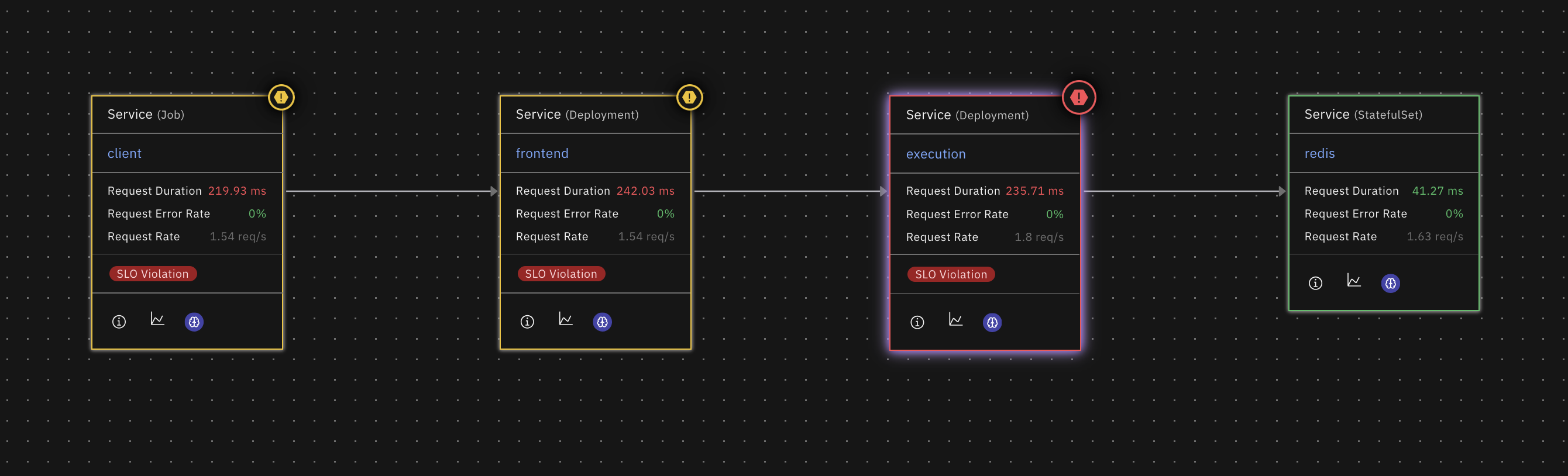
If the entities and connections you are expecting to see are not appearing, go to the Integrations page and check for any errors for the telemetry sources you have configured.

Errors in the integrations page will prevent Causely from discovering entities and connections in your environment. Follow the troubleshooting steps to resolve the errors.
Connect Causely to AI Agents
Give your agents access to Causely's causal model via the MCP server. Any MCP-compatible agent or assistant including Claude Code, Cursor, VS Code, HolmesGPT, or your own custom agent, can query root causes, service health, dependency maps, and reliability reports directly.
Visit the agent integration page to get started.
While this quickstart guide focuses on Kubernetes, Causely also supports:
- Container Orchestration: Nomad, Docker, ECS
- GitOps: Argo CD, Flux
- Virtual Machines: Direct installation on VMs
For detailed installation instructions for these platforms, visit the Installation Overview page.