Custom Workflows
To send Causely notifications to a custom destination, you route them through CauselyBot, an open source webhook service that receives the Causely notification payload and forwards it to the endpoints you configure. For arbitrary HTTP endpoints (n8n, Linear, custom services), use CauselyBot's generic hook type.
Use CauselyBot when you want full control over how the webhook is processed and the exact payload sent to your target system.
If you only need to forward Causely's standard payload to an HTTP endpoint as-is, use the simpler Generic Webhook option instead.
Routing and rules for Managed Notifications are configured in the Causely UI:
Set up notification routing in the UI
Setup
Step 1: Enable notifications in values.yaml
In your causely-values.yaml, enable mediator notifications:
mediator:
  notifications:
    enabled: true
Apply the change:
helm upgrade --install causely --create-namespace \
  oci://us-docker.pkg.dev/public-causely/public/causely \
  --version <version> --namespace=causely --values ./causely-values.yaml
Step 2: Deploy CauselyBot
Create a causelybot-values.yaml with your webhook configuration. For a generic HTTP endpoint:
auth:
  token: "<YourCauselyBotToken>" # Required - define your token here and then use in the CauselyBot secret creation in step 3.

webhooks:
  - name: "my-generic-webhook"    # Provide a friendly name for the webhook
    hook_type: "generic"
    url: "https://<YourWebHookEndpoint>"
See the CauselyBot documentation for all supported hook types and options.
Install CauselyBot via Helm:
helm upgrade --install causelybot ./causelybot/helm/causelybot \
  --namespace causelybot --values causelybot-values.yaml
Step 3: Create the notification Secret
Create a Kubernetes Secret in the causely namespace that points Causely at CauselyBot (use stringData so values are plain text; if you use data, values must be base64-encoded):
apiVersion: v1
kind: Secret
type: Opaque
metadata:
  name: causelybot-notification-config
  namespace: causely
  labels:
    causely.ai/notif-config: CauselyBot   #Required
stringData:
  notif_config_name: causelybot-webhook
  notif_config_global: "false"
  notif_config_type: CauselyBot
  notif_config_url: https://<CauselyBotURL>/webhook  # or if in-cluster: http://causelybot.causelybot.svc.cluster.local.:5000/webhook
  notif_config_token: "<YourCauselyBotToken>"
  notif_config_filters: "[]"
  notif_config_filters_enabled: "true"
notif_config_token must match the auth.token you set in CauselyBot's configuration. Causely sends it as Authorization: Bearer <token> so CauselyBot can authenticate the request.
Filtering notifications (notif_config_filters)
notif_config_filters is a JSON array that controls which notifications are forwarded to CauselyBot. When notif_config_filters_enabled is "false" or the array is empty ("[]"), all notifications pass through.
Multiple filters are ANDed: a notification must match all filters to be forwarded.
Filterable fields
| Field | Description |
|---|---|
severity | "Low", "Medium", "High", or "Critical" |
name | Problem name (for example, "Malfunction", "CPUCongested") |
entity.type | Entity type (for example, "KubernetesService", "ApplicationInstance") |
labels.k8s.cluster.name | Kubernetes cluster name |
labels.k8s.namespace.name | Kubernetes namespace name |
impactsSLO | true if the notification includes impacted SLOs |
Supported operators: equals, not_equals, in, not_in
Examples
Forward only High and Critical severity notifications:
notif_config_filters: '[{"field":"severity","operator":"in","value":["High","Critical"]}]'
notif_config_filters_enabled: "true"
Forward notifications from a specific cluster only:
notif_config_filters: '[{"field":"labels.k8s.cluster.name","operator":"equals","value":"prod"}]'
notif_config_filters_enabled: "true"
Forward only SLO-impacting issues in a specific namespace:
notif_config_filters: '[{"field":"impactsSLO","operator":"equals","value":true},{"field":"labels.k8s.namespace.name","operator":"equals","value":"production"}]'
notif_config_filters_enabled: "true"
Example: GitHub via CauselyBot
- Deploy CauselyBot and configure a webhook with
hook_type: github,url: "owner/repo", and a GitHub token (repo and issues scope). Optionally setassigneein CauselyBot's config. - In the Secret above, set
notif_config_urlto CauselyBot's webhook URL andnotif_config_tokento CauselyBot's auth token. - Causely sends notifications to CauselyBot; CauselyBot creates or updates GitHub issues from the payload.
You can assign an issue to GitHub Copilot by setting the assignee to copilot-swe-agent, which will trigger Copilot to analyze the issue and suggest a fix
in a pull request.
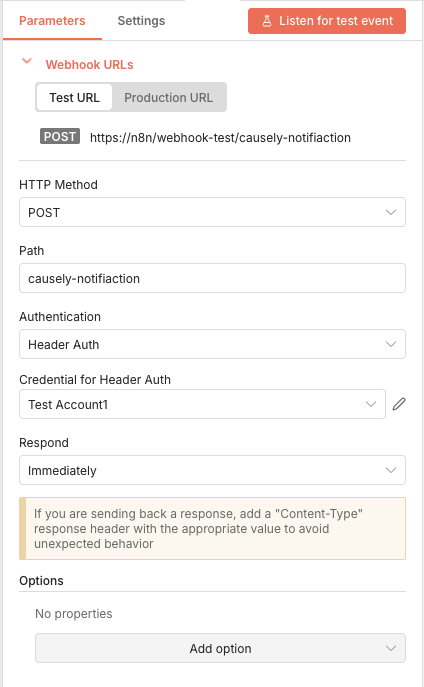
Example: Generic webhook (n8n, Linear, etc.)
To send to n8n or any other HTTP endpoint:
- In CauselyBot's
causelybot-values.yaml, add a webhook withhook_type: genericand seturlto your destination endpoint (for example, the n8n Webhook node URL). - Create the Causely Secret as described in Step 3 above, pointing
notif_config_urlat CauselyBot. - CauselyBot forwards the raw Causely notification payload to your endpoint.
- In n8n, read the incoming JSON fields (for example,
name,entity,severity,description,link) from the notification payload and use them in downstream nodes (Slack, email, Linear, etc.).
Notification payload format
Causely sends the same structured JSON to all webhook destinations. For field descriptions and an example, see Notification Payload Format.