v1.0.139
Configure Causely from your agent
Causely's MCP server now includes tools for configuring detection: metric thresholds, service priority tiers, and Issue snoozing. Until now these settings were only available in the UI, so tuning noise or onboarding a new service meant leaving the agent session used to investigate. An agent or engineer can now raise a threshold when a Signal fires on a value that is normal for that service, prioritize or hide an entity, enable SLO tracking on a non-Service entity such as an HTTP path or queue, and snooze an Issue until a chosen time, all in the same conversation. Configuration tools require the Developer or Administrator role.
New tools: create_threshold_configuration, get_threshold_configurations, update_threshold_configuration, delete_threshold_configuration, get_supported_threshold_metrics, get_service_tier, set_service_tier, clear_service_tier, ignore_issue, unignore_issue, get_issue_ignore_status.
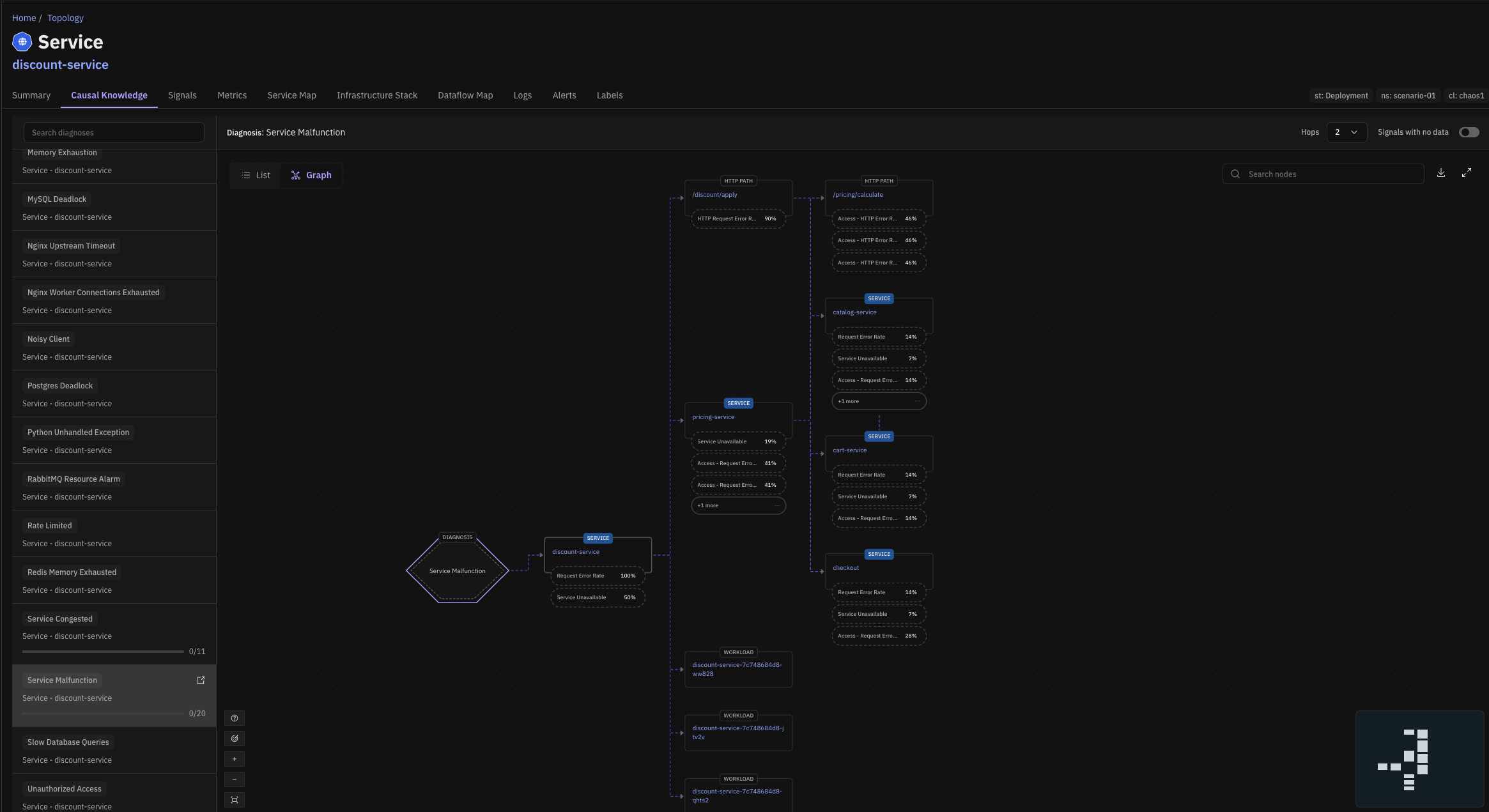
Entity Causality graph
Causely now includes an Entity Causality graph that shows how Causely's causal knowledge applies to your topology. For any entity, you can see which diagnoses Causely can identify on it, which Signals each diagnosis would produce, and how those effects propagate to the entities that depend on it. Before, this was presented as a flat list of Signals, so it was hard to tell how they connect and propagate through the entities in your system. The graph lets you inspect that understanding ahead of time and confirm the model reflects how your system actually fits together, across services, infrastructure, and the dependencies between them.
More precise Issue grouping and summaries
Issues now merge only when their Signals overlap within a bounded time window. Before this change, a broad diagnosis such as node CPU congestion could pull unrelated Issues into one thread spanning many services, which made the Issue hard to act on. Issues stay scoped to one problem, and when Issues do merge, the start time reflects the earliest diagnosis rather than the moment of the merge.
Issue titles and summaries are also more specific, and description generation is fixed in environments where titles were generated but descriptions were not. The summary generator is stricter about log relevance, reducing cases where unrelated log noise, such as TLS errors from internet scanners, is presented as causal.
Minor Improvements
- Weekly email: The weekly summary email now reports Issues rather than root causes, matching the rest of the product.
- GKE Autopilot: Causely now installs on GKE Autopilot clusters, which previously rejected the agent and Mediator due to host networking and hostPath restrictions.
- Multi-cluster gateway discovery: GKE Gateway API discovery across a multi-cluster fleet no longer creates duplicate gateways with the same name.
- Microsoft Teams notifications: Fixed notifications rejected by Teams because of an unsupported action in the card body. This affected both diagnosis and Issue notifications.
- Notification configs: Removing a cluster from a notification config now stops delivery from that cluster without a manual Mediator restart.
- Entity summary: The event timeline is now sorted chronologically.
- Data sources table: The cluster name column is wider by default.